
If I had to boil this guide down to one point, it’s this: the best DM screen depends on how I run my table. In this 2026 roundup, the picks split into three clear lanes: fast rules reference, swap-in custom notes, and all-in-one table control.
Here’s the short version:
- WyrmCodex is the pick if I want a full DM station in one unit: screen, dice tower, magnetic panels, and a refillable journal.
- WotC Dungeon Master’s Screen Reincarnated is the simple 5e pick if I want core rules in front of me right away.
- WotC adventure screens work best if I’m running one published module for a long stretch.
- Ultra PRO and Stratagem make more sense if I print lots of notes, maps, and handouts.
- Hexers and Wyrmwood lean toward modular setups, with Hexers focused on panel swapping and Wyrmwood focused more on build and table look.
- Portable and half-height screens are the better fit for travel, store play, and tight tables.
The guide also points to three buying checks that matter most:
- Table space
- How often I travel with gear
- Whether I run one system or switch often
A few numbers stand out. The official WotC Reincarnated screen is listed at 9.7/10, Hexers at 9.3/10, Stratagem at 9.2/10, and some module screens reach 9.9/10. Ultra PRO also stands out for size, with room for up to 40 pages of inserts, though that comes with a 42.77-inch open width.
Quick Comparison
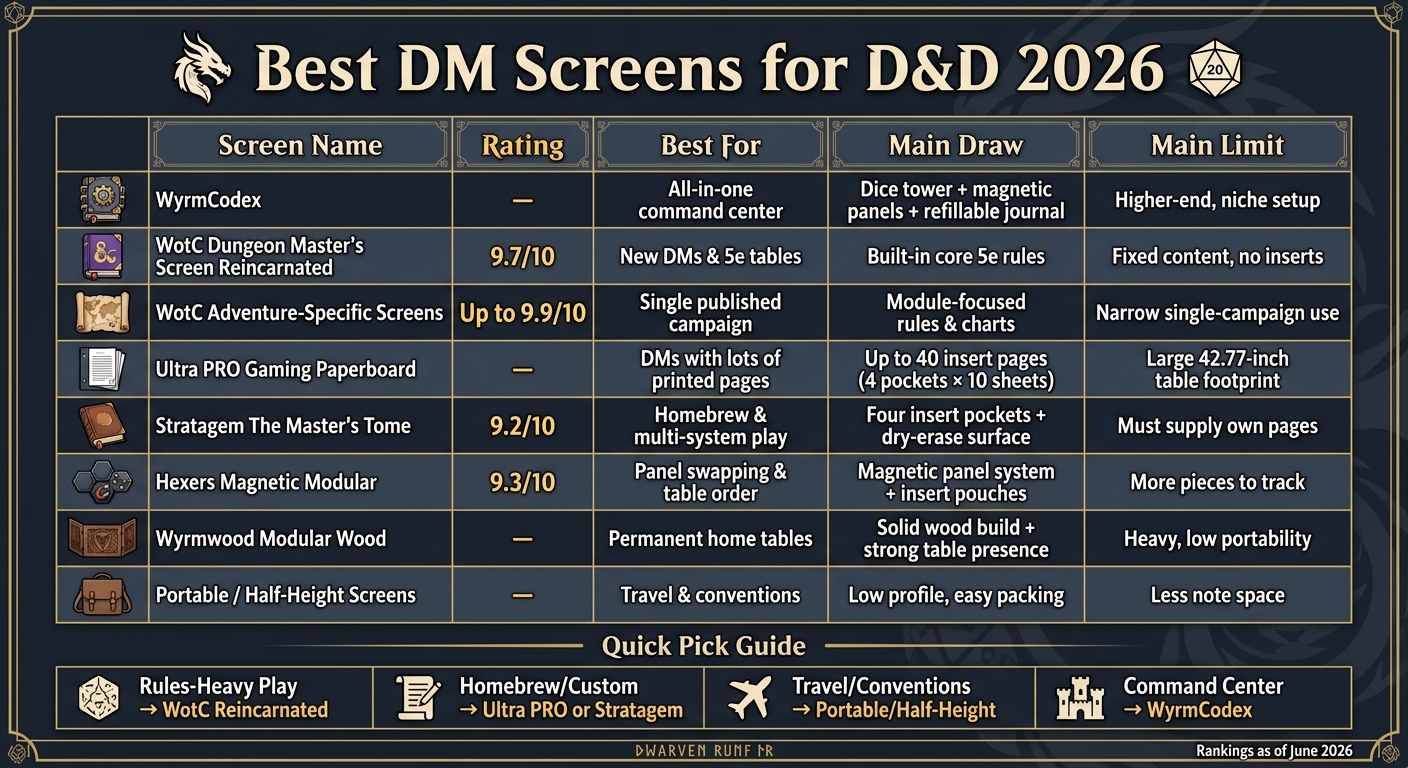
Best DM Screens for D&D 2026: Side-by-Side Comparison
| Screen | Best For | Main Draw | Main Limit |
|---|---|---|---|
| WyrmCodex | DMs who want one all-in-one setup | Dice tower, magnetic panels, journal in one unit | Higher-end, niche setup |
| WotC Reincarnated | New DMs, 5e tables | Built-in core 5e rules | Fixed content |
| WotC Adventure Screens | One published campaign | Module-focused rules and charts | Narrow use |
| Ultra PRO Paperboard | DMs with lots of printed pages | Up to 40 insert pages | Large table footprint |
| Stratagem The Master’s Tome | Homebrew and multi-system play | Four insert pockets and write-on surface | I need to supply my own pages |
| Hexers Magnetic Modular | Panel swapping and table order | Magnetic panel system and insert pouches | More pieces to track |
| Wyrmwood Modular Wood | Home tables | Solid wood build and modular parts | Heavy to carry |
| Portable / Half-Height | Travel and conventions | Low profile and easy packing | Less note space |
So if I want the shortest path to a good pick, I’d match the screen to my use case first: official rules screen for speed, insert screen for custom play, or command-center screen for one-box control.
sbb-itb-74d578b
1. WyrmCodex DM Screen
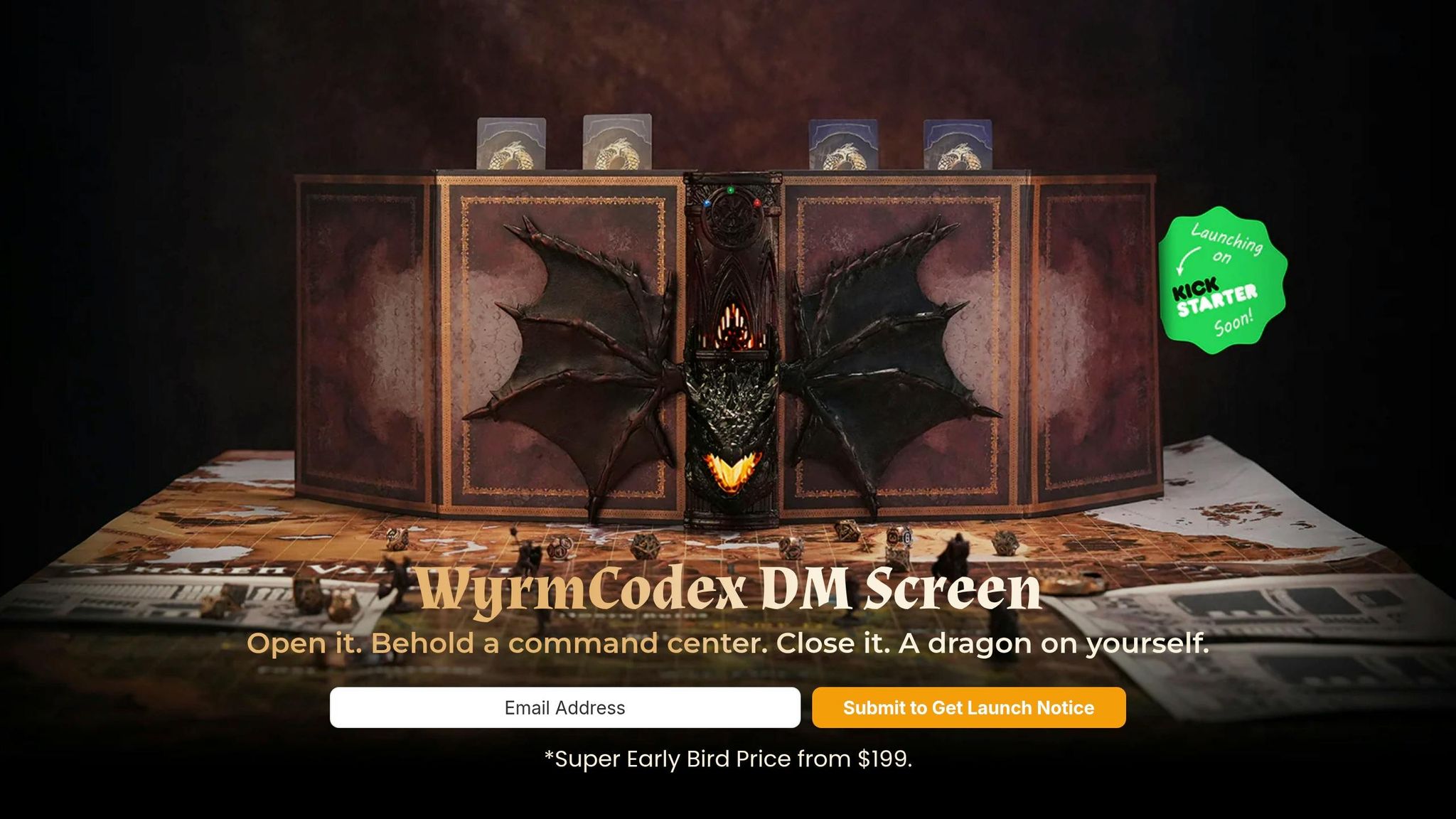
WyrmCodex ditches the standard fold-out screen and goes with a dragon-forged tome design instead. The idea is simple: this is more than a screen. It’s built for DMs who want a full command center at the table, combining a DM screen, an integrated dice tower, magnetic modular panels, and a refillable ring-bound campaign journal in one portable setup.
Session Control
The screen has dry-erase surfaces that make it easy to track initiative and update details on the fly. Magnetic mount points across the inside panels let you place initiative cards and reference inserts exactly where you want them. That means less page-flipping and less table clutter, with key info staying in view during play.
Customizable Layout
The magnetic panels can be rearranged for different sessions. So if one game needs more rules references and another needs more room for tracking notes, you can shift the layout to match.
Portability and Footprint
It folds shut like a tome and opens ready to use, with no assembly needed. For DMs who want one premium carry case for notes, rolls, and reference cards, that setup makes a lot of sense.
Accessory Integration
The built-in dice tower keeps rolls at the edge of the table, which helps keep your play space under control. The lighting adds table presence without extra setup. And the refillable journal keeps campaign notes inside the same unit, so your notes, rolls, and reference tools all stay together during play. It also works well across multiple tabletop systems.
For DMs who want a simpler, more standard layout, the next pick is Wizards of the Coast's Dungeon Master's Screen Reincarnated.
2. Wizards of the Coast Dungeon Master's Screen Reincarnated

If you want an official 5e screen that just does the job without extra fuss, the Wizards of the Coast Dungeon Master's Screen Reincarnated is a solid pick. As of June 2026, it holds a 9.7/10 rating and an Exceptional mark [3].
Reference Workflow
The inside panels come pre-printed with core 5e rules, including combat actions, condition reminders, and common Difficulty Class (DC) benchmarks [1][3]. That means less page-flipping and fewer pauses when the table is waiting on a call.
The layout is clean, and the labels are easy to spot at a glance. During play, that matters more than people think. You don't want to hunt for a condition rule while the rogue is already asking, “So can I still move?” High-contrast panels help you scan fast and keep the session moving [3].
Portability and Footprint
The screen uses lightweight cardstock, so it folds flat and slips in next to your rulebooks without much trouble [3]. If you carry your gear to another house, a game store, or a convention, that low-bulk build is handy.
Its landscape shape also keeps the screen lower than taller designs. That makes it easier to keep eye contact with players and see what's happening across the table [1]. Small detail, big difference.
Compatibility
This screen keeps things simple. It doesn't include magnets, dry-erase material, or built-in pockets [5].
That said, it works well with common table add-ons like:
- sticky notes
- initiative clips
- condition markers
So if you like adding your own little system on top, you've got room to do that without fighting the screen's design [3][6].
For a more tailored official option, the next screen shifts to adventure-specific layouts.
3. Wizards of the Coast Adventure-Specific DM Screens
If your campaign is built around one official module, these screens can save you a lot of page-flipping. Instead of showing broad 5e rules, the inside panels focus on the stuff that matters for that one adventure. Think survival systems, weather effects, travel rules, or horror-flavored NPC generators. That means faster rulings at the table and less time digging through the book.
Reference Workflow
At the table, this setup shines when your game keeps returning to the same setting, mood, or special rules. When those niche mechanics are right in front of you, play tends to move with less friction. The Dungeon Master's Screen Wilderness Kit is rated 9.4/10, while Curse of Strahd: Revamped Premium Edition earns 9.9/10; both are praised for their immersive artwork and the convenience of module-specific charts [3].
Customizable Layout
Here’s the tradeoff: standard adventure screens are fixed. You can’t swap the panels or slide in your own reference pages. So if you use house rules or want extra reminders, sticky notes and removable labels are usually the go-to fix.
One licensed option goes in a different direction. The Ultra PRO Drizzt/Forgotten Realms screen includes four clear, write-on gusseted pockets, and each pocket holds up to 10 sheets of paper. That gives you space for custom maps, campaign notes, and whatever else you want within reach [4].
Portability and Footprint
Standard adventure screens use lightweight cardboard, so they fold flat and are easy to carry. The premium Ultra PRO version is heavier and uses a tri-fold leatherette build, so you give up a bit of portability in exchange for a more substantial feel [4].
Accessory Integration
Out of the box, standard WotC adventure screens work fine with add-ons like initiative clips and sticky notes. The premium licensed version builds some of that into the product itself, with included static-cling reusable stickers for condition tracking and a dry-erase marker for quick notes during play [4]. Standard screens stay locked on one adventure. Premium versions give you more room to organize your table your way.
If fixed panels feel a little too limiting, the next set of options moves into modular and premium setups.
4. Ultra PRO Gaming Paperboard DM Screen
The Ultra PRO Gaming Paperboard DM Screen takes a different approach from screens with fixed rule panels. Instead, it uses four insert pockets. Each pocket can hold up to 10 sheets of 8.5" x 11" paper, which gives you room for up to 40 pages of custom inserts. That setup makes a lot of sense if your prep shifts from one session to the next.
Reference Workflow
You can swap in only the pages you need for a given game night - spell lists, maps, encounter notes, or handouts. That makes it a good fit for DMs who jump between systems or run heavily customized campaigns [4].
Customizable Layout
The clear pocket surface also works as a write-on layer for initiative, movement, or inventory tracking. In plain terms, you can write over your reference sheets without marking them, while the printed notes stay protected underneath [4].
Portability and Footprint
There is a tradeoff, though. When fully opened, it measures 42.77 inches wide and 11.79 inches tall, so it takes up a lot of table space [4].
Accessory Integration
Out of the box, it comes with:
- a dry-erase marker
- 8 initiative tracker clips
- 4 pages of static-cling reusable stickers for condition tracking and enemy placement [4]
The initiative clips attach outside the pockets, which keeps combat order visible during play [4].
If you want that same custom-reference flexibility in a more sculpted, booklike premium build, the next screen moves in that direction.
5. Stratagem The Master's Tome
Stratagem's The Master's Tome has a 9.2/10 (Excellent) rating as of June 2026 [3]. Its four-panel design gives you more room than a standard three-panel screen. In practice, that means more reference material in front of you, more space for larger maps, and extra cover for hidden rolls [3]. If you want a screen that stays flexible without jumping all the way to full modular hardware, this sits in a nice middle spot.
Reference Workflow
The screen comes with reference inserts [3]. The main draw here is the ability to swap in campaign material as needed, including NPC sheets and encounter reminders [3]. That kind of setup makes session prep feel less like juggling loose papers and more like having the right note ready at the right time.
Customizable Layout
Each of the four panels has a slide-in vinyl pocket sized for standard 8.5" x 11" paper [3]. So if you use D&D notes, house rules, or encounter sheets, you can slot them in without any fuss [3]. The surface also works with dry-erase markers, which is handy when you need to track initiative, hit points, or temporary conditions right on the screen [3].
Portability and Footprint
Even with the wider four-panel layout, The Master's Tome is foldable and lightweight, so it's easy to bring to conventions or a friend's table [3]. The vinyl pockets also help protect your inserts from wear during frequent transport [3].
For DMs who want more built-in flexibility, the next options move into modular and magnetic systems.
6. Hexers Magnetic Modular DM Screen Systems
Hexers sticks with the modular idea, but the setup feels cleaner and easier to manage at the table. As of June 2026, the Hexers Game Master Screen holds a 9.3/10 (Excellent) rating [3]. With four modular panels and clear pouches, it works well for DMs who want a screen they can tweak from session to session. It’s a good match for quick-reference inserts, visible tracking, and a layout that changes based on what the night calls for.
Reference Workflow
Each panel includes a clear pouch for printed inserts, so you can drop in combat actions, conditions, spell lists, house rules, or campaign-specific references [3]. That setup is simple, but it solves a common table problem: keeping the stuff you need in front of you without burying it under papers.
A dry-erase tracker surface gives you space for initiative, hit points, and temporary status effects [5][2]. So while the encounter is moving, your key references stay in view and your tracking stays in one place.
Customizable Layout
The magnetic modular design lets you rearrange panels as needed [5]. If you’re running a combat-heavy session, you can load in actions and conditions. If the night leans more toward roleplay, you can swap to house rules, NPC notes, and encounter details. That kind of flexibility makes the Hexers screen a strong option for GMs who bounce between multiple systems [3].
Portability and Footprint
The Hexers system folds flat for transport [3], which makes life easier if you’re carrying gear from one table to another. It doesn’t ask for a lot of space when packed up, and that alone can be a big deal for DMs who travel light.
Accessory Integration
The pouches are built for printed inserts, so loading your own reference sheets from places like DM's Guild or Reddit is easy [5][3]. You can swap notes, trackers, and handouts between sessions without much fuss, which helps keep prep tighter and combat flow smoother at the table.
If you want something with a more polished physical build, the next screens shift into premium materials and a stronger table presence.
7. Wyrmwood Modular Wood DM Screens
Wyrmwood's modular wood screens are made for DMs who want a premium, long-term centerpiece for the table. The solid wood build gives the screen a dramatic, immersive look. It feels like part of the table itself, not just something set in front of the players. For DMs who care about table presence, that difference stands out.
The modular panels also give you room to change things up between sessions, which is handy if one game night calls for one setup and the next needs another.
Reference Workflow
Some configurations include gusseted pockets for standard pages and dry-erase surfaces for initiative or condition tracking[4][3][5].
Portability and Footprint
Because it's made of wood, this screen has more weight. That makes it a better fit for a regular home table than for a light travel kit[3].
Accessory Integration
Magnetic mounts keep initiative trackers, map inserts, and other reference tools attached and in order. That can cut down setup time and keep the play space cleaner during a session[2].
If you want something lower-profile for a tight table or for travel, the next section moves to compact and half-height screens.
8. Portable and Half-Height DM Screens
Portable and half-height DM screens are built for DMs who are always on the move. They take up less space, pack fast, and make setup easier. That makes them a strong pick for road games, store nights, and convention tables.
Reference Workflow
Compact screens give up some panel height to make travel easier, so they usually focus on condensed rules and core tables [3]. That trade-off makes sense. You get the stuff you need most, right in front of you, without hauling a bulky screen around.
Some DMs also pair a smaller screen with a tablet for deeper notes and extra references, all without taking up more table space [6]. It’s a simple setup, but it works well when you want both speed and flexibility.
Customizable Layout
If you want a screen you can tweak from game to game, check for clear, gusseted pockets and dry-erase surfaces. Pockets make it easy to swap campaign pages in and out. Dry-erase panels are handy for initiative, status effects, and short-term conditions that change during play.
That kind of setup feels a lot less rigid. Instead of fighting your tools, you can update things as the session moves.
Portability and Footprint
Landscape screens are often the best fit for travel because their lower profile keeps sightlines open [1]. That matters at a crowded store table or a convention game where space is tight and everyone wants to see the map.
Material matters too:
- Cardboard works fine for occasional use.
- Leatherette and heavy-duty plastic tend to hold up better if you’re packing and unpacking the screen a lot [3].
Accessory Integration
Some magnetic modular systems can hold a tablet or phone mount, which keeps digital references inside the screen’s footprint [2]. That’s a nice touch if you use apps, PDFs, or encounter trackers and don’t want devices spilling across the table.
At that point, the decision is pretty simple: pick the screen that lines up with how you run games most often - easy transport, swap-friendly panels, or extra built-in add-ons.
Key Tradeoffs by Buying Priority
Once you’ve narrowed down the individual options, the next step is simple: pick based on how you actually run your table. In practice, most DM screens come down to four things that matter most: rules references, customization, table footprint, and built-in tools.
If your group leans hard on printed rules, an official reference screen usually makes the most sense. The key tables are right in front of you, which helps with fast checks during play. On the other hand, if you make a lot of rulings on the fly or run homebrew-heavy sessions, pocketed or magnetic screens give you more control because you can load your own notes, maps, and cheat sheets.
Homebrew campaigns tend to work best with clear pocket inserts. They’re easy to swap, and you can tailor the setup from session to session. Magnetic systems go a step further. They give you the most freedom with panel layout and usually support extra attachments too.
Table space matters more than people think. A crowded game store or convention table often calls for a low-profile landscape or half-height screen. You keep sightlines open, and the setup doesn’t eat the whole table. If you play at home and leave your gear set up, a heavier screen with more add-ons can work just fine.
Here’s the quick match-up:
| Buying Priority | Best Screen Type | Why It Works |
|---|---|---|
| Rules-Heavy Play | Official Reference (e.g., WotC Reincarnated) | Keeps core 5e tables and condition reminders visible for quick rulings [1] |
| Rulings-First / Homebrew | Pocket-Based (e.g., Ultra PRO Premium) | Swap-friendly pockets make it easy to load house rules, maps, and campaign sheets [4] |
| Travel / Small Space | Landscape / Half-Height | Low-profile landscape screen helps with eye contact and crowded tables [1] |
| Accessory-Rich Command Center | Modular Magnetic | Snap-on initiative trackers, tablet holders, and magnetic panels [2] |
| All-in-One Tome | WyrmCodex | Integrated dice tower, magnetic command panels, and a refillable campaign journal in one portable setup |
WyrmCodex sits in its own lane a bit. It combines the screen, dice tower, magnetic panels, and campaign journal into one portable command-center-style setup. So at that point, the choice is less about “good vs. bad” and more about what kind of DM station you want: a simple reference screen, a modular rig, or a full command-center build.
Pros and Cons
Here’s the fastest way to match each screen to the way you run your game.
| Screen | Main Pro | Main Tradeoff | Best For |
|---|---|---|---|
| WyrmCodex | All-in-one dragon-tome design: integrated dice tower, magnetic panels, and refillable campaign journal | Premium, specialized setup | DMs who want a self-contained command center |
| WotC Dungeon Master's Screen Reincarnated | Official 5e reference charts; compact profile | Fixed content; no insert swapping | New DMs; fast-setup sessions |
| WotC Adventure-Specific Screens | Module-focused reference panels for one campaign | Single-campaign use; not reusable across systems | DMs running a specific published adventure |
| Ultra PRO Premium | Large insert capacity for printed notes and handouts | Bulky footprint at smaller tables | DMs who run lots of printed notes and handouts |
| Stratagem The Master's Tome | Four-panel custom inserts with dry-erase surface | Requires printing your own inserts | DMs running homebrew or multiple TTRPG systems |
| Hexers Game Master Screen | Magnetic modular layout with swap-ready inserts | More parts to manage than static screens | DMs who prioritize table organization and flexibility |
| Wyrmwood Modular Wood | Wood build and strong table presence | Low portability due to weight | Permanent home setups where aesthetics matter most |
| Portable / Half-Height Screens | Lightweight, low-profile, travel-friendly | Limited vertical coverage and note space | Traveling DMs; convention play |
The pattern is pretty clear. If you want one screen that does a bit of everything, WyrmCodex leans into that command-center feel. If you just need fast rules access and don’t want to overthink it, the WotC Dungeon Master's Screen Reincarnated keeps things simple.
On the other hand, some options are built for a narrower job. WotC Adventure-Specific Screens make the most sense when you're deep into one published module. Ultra PRO Premium and Stratagem The Master's Tome fit DMs who like printed sheets, custom notes, and swapping material between games.
Then there’s the table-space issue. Bigger screens can feel great at home, but they’re not always fun to pack up or squeeze onto a small surface. That’s where Portable / Half-Height Screens earn their keep. And if your setup stays put and looks matter as much as function, Wyrmwood Modular Wood has that heavy, planted-at-the-head-of-the-table feel.
So the choice gets easier once you focus on three things: how you prep, how much table room you have, and how often you carry your gear around.
Conclusion
The right DM screen depends on how you run your table. Looking across the 2026 field, the best pick is the one that fits your prep style, table size, and the pace of your sessions.
If you're new to DMing, an official screen like the Dungeon Master's Screen Reincarnated is usually the easiest place to start. It keeps core 5e tables close by and works right out of the box.
If you run more than one system or travel a lot, modular and compact screens tend to make more sense. Modular picks like Stratagem The Master's Tome or Hexers let you swap reference inserts between systems without much hassle. Portable and half-height screens are also easier to pack and carry without taking up too much space.
For long-running campaigns at a permanent home table, premium builds often make the most sense. That could mean the strong table presence of Wyrmwood's wood screens or WyrmCodex, which follows a different design approach: an integrated dice tower, magnetic panels, and a refillable campaign journal built into a single dragon-bound tome.
Match your screen to the way you play: concealment, quick-reference needs, note handling, accessory support, and table footprint all matter. Pick the one that suits your workflow, and running the table gets faster, cleaner, and easier.
FAQs
Which DM screen is best for a new 5e DM?
For a new 5e Dungeon Master, the best DM screen comes down to three things: ease of use, organization, and fast access to the rules and notes you’ll reach for all the time.
The Ultimate Game Master Modular Magnetic GM Screen is a strong pick for beginners because it gives you a flexible, customizable layout and built-in dry-erase surfaces. That means you can set it up the way you like, then jot down notes, initiative, or reminders without juggling extra paper.
If you want something more simple, the official D&D 5e screen is also a solid choice. It offers a straightforward setup with quick-reference charts for common rules, which can make running the game feel a lot less hectic.
What type of DM screen is best for homebrew campaigns?
For homebrew campaigns, the best DM screen is one that gives you flexibility and room to customize.
That’s why modular or magnetic screens tend to work so well. You can rearrange panels, swap in custom inserts, and add things like dry-erase surfaces or campaign-specific reference sheets. In plain terms: your screen can change as your world changes.
Screens with note pockets or map storage are also handy. They help you keep rules, tables, maps, and session updates in one place, so it’s easier to stay organized as the campaign grows and shifts.
How much table space does a larger DM screen need?
A larger DM screen needs enough table space to hide notes and dice rolls without feeling cramped. It also helps keep your reference material close at hand.
For most setups, 10 to 12 inches tall is the sweet spot. That height usually gives you enough coverage to conceal information while also creating a dramatic backdrop for battles.