
If I want hidden rolls and rules in front of me at all times, I pick a DM screen. If I want an open table and an easy-to-carry setup, I pick a folder.
That’s the whole choice in one line. A screen gives me privacy, at-a-glance rule checks, and a steady setup across sessions. A folder gives me more storage, less bulk, and better eye contact with players. In most cases, the better pick comes down to 4 things:
- Privacy: Do I need to hide notes, maps, and dice rolls?
- Speed: Do I need rules visible without page flipping?
- Table space: Do I have room for a screen, or do I need a flatter setup?
- Travel: Am I staying at one table, or packing up every session?
A lot of DMs end up in one of these camps:
- Home campaign with lots of combat: screen
- Travel game or shared space: folder
- Roleplay-heavy game with fewer rule checks: folder
- Rules-heavy game with lots of moving parts: screen + folder
One point stands out: a screen usually gives me 3 to 4 vertical panels of reference space, while a folder gives me more total page storage but slower access in the moment. So the better tool is not about looks. It’s about what I need to reach fast during play.
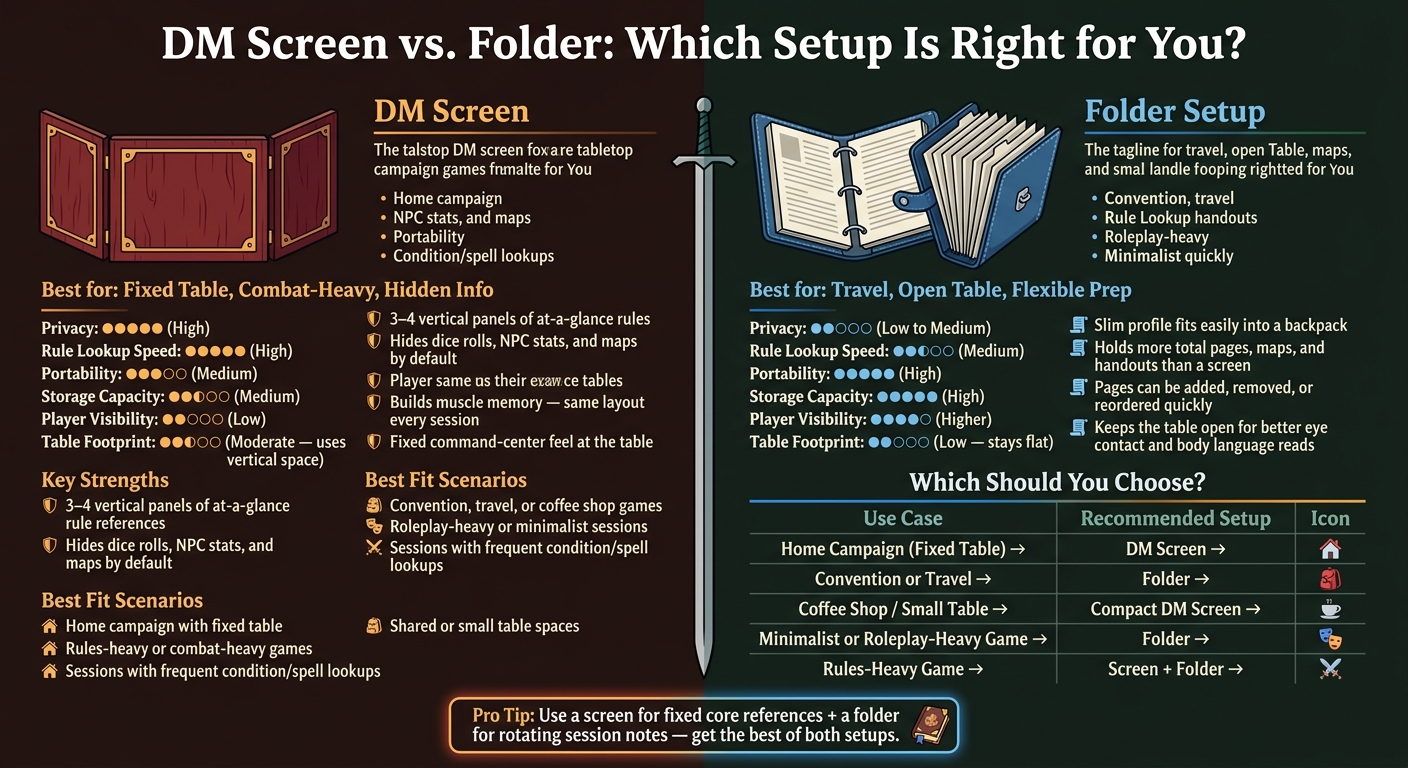
DM Screen vs. Folder: Side-by-Side Comparison for Dungeon Masters
D&D: Map Folder (Behind the Dungeon Master Screen)
sbb-itb-74d578b
Quick Comparison
| Criteria | DM Screen | Folder |
|---|---|---|
| Privacy | High | Low to medium |
| Rule lookup speed | High for repeated checks | Medium |
| Table footprint | Uses vertical space, but needs room up front | Stays low, but can spread across the table |
| Portability | Medium | High |
| Storage capacity | Medium | High |
| Player visibility | Lower | Higher |
| Best fit | Fixed table, hidden info, combat-heavy play | Travel, open table, lighter prep style |
If I’m choosing between the two, I don’t ask which one is “better” on its own. I ask which one makes this session easier to run.
DM Screen Setup: Best for Privacy and Quick Reference
A DM screen is a foldable three- or four-panel barrier that sits between you and your players. The inside faces you and holds rules references. The outside usually shows art to the players. In practice, a DM screen gives you speed and privacy at the same time. It’s less of a simple divider and more of a fixed reference wall.
What a Screen Typically Holds During Play
The inside panels keep your most-used rules in view without cluttering the table. A tight setup often includes combat references, condition notes like blinded or prone, spell rules, saving throw guidance, initiative trackers, and hidden monster stats or NPC notes behind the screen.
That setup helps play move faster because the same references stay in the same spot every session. No digging through papers. No flipping between tabs. If you want your notes visible to you but out of sight for everyone else, a screen is built for exactly that.
Where a Screen Works Best at the Table
A screen works best when rules lookups are a normal part of play. If combat comes up often, conditions stack, and you make hidden rolls on a regular basis, the screen helps keep things moving.
| Feature | DM Screen Performance |
|---|---|
| Privacy | High - conceals rolls, notes, and physical props like minis and maps |
| Table Footprint | Moderate to high - requires a dedicated arc of space along the table edge |
| Rule Visibility | Excellent - 3–4 panels of vertical, eye-level reference always in view |
That concealment gives you one workspace for hidden rolls, encounter notes, and table-side tools. And that’s the big strength of a DM screen: everything stays put. Of course, that’s also the tradeoff. The screen favors a stable setup, while a folder is easier to carry and easier to rearrange.
If you want a fixed command center, a screen fits the job. If your notes need to travel with you, a folder makes more sense.
Folder Setup: Best for Portability and Modular Notes
A folder-based setup keeps your notes portable, modular, and easy to carry without taking over the table. That might mean a ring binder, an accordion file, or a simple cheat sheet packet that holds notes, maps, initiative sheets, and rule summaries in one place. Different formats work for different Dungeon Masters, but they all share two big strengths: flexibility and a low profile. That makes this setup a smart fit for travel games, shared tables, and DMs who want their material close by without putting up a wall.
Common Folder Formats and What They Hold
A slim folder can handle one session’s notes and a few maps without much fuss. If you’re running a longer campaign, a ring binder gives you more room to grow. You can add tabs for NPCs, locations, rule summaries, and session notes, then move pages around as the campaign shifts.
Tabbed organizers help when you want each type of material in its own lane. One section can hold current encounters, another can track recurring NPCs, and another can store player handouts. It’s simple, but that’s the point.
Where a Folder Outperforms a Screen
The biggest win here is portability. A slim binder or accordion file slides into a backpack without adding much bulk. If you run games in coffee shops, at a friend’s house, or in any shared space, that matters.
The other big plus is an open table. A tall screen can act as a wall between you and your players, cutting off eye contact and body language reads [1]. A folder stays flat, tucks off to the side, or sits on a TV tray near the table. That leaves more room for maps, minis, and dice, and it can make the whole setup feel less boxed in.
| Feature | Folder Setup Performance |
|---|---|
| Portability | High - slim profiles fit easily into standard bags or backpacks |
| Storage | High - holds far more pages, maps, and handouts than a screen |
| Customization | High - pages can be added, removed, or reordered quickly |
| Lookup Speed | Moderate - requires manual flipping or reordering |
The tradeoff is speed. In the middle of combat, flipping to the right tab usually takes longer than glancing at a reference panel that stays in view. So if you lean on constant rules checks, a folder may feel a bit slower. But if you care more about table space, easy travel, and a setup that stays out of the way, that trade can make a lot of sense.
Head-to-Head: Privacy, Speed, Footprint, and Session Flow
Put them side by side, and the tradeoffs show up fast. Each option has its lane depending on how you play: combat-heavy home sessions, grab-and-go travel kits, or stripped-down tables.
Here’s the practical difference at a glance.
| Feature | DM Screen | Folder Setup |
|---|---|---|
| Privacy | Built-in barrier hides rolls, maps, and notes | You have to cover information manually |
| Reference Speed | The same vertical layout builds muscle memory across sessions | Requires picking up and flipping to the right page under pressure |
| Table Footprint | Preserves surface space by using vertical room | Spreads outward when open |
| Portability | Moderate - foldable, though usually bulkier than a folder | High - slim profiles fit easily into a backpack |
| Session Flow | Fixed references stay in view throughout play | Rotating notes and handouts can be swapped between encounters |
When a Screen Is Faster and When a Folder Is Faster
Speed matters most when the same rules keep coming up. A screen tends to be faster when the same reference stays in the same spot every session. [1] After a while, you stop hunting for it and just reach for it.
A folder can be faster in a different way. If you like working from a prepared encounter packet or swapping handouts between scenes, a folder makes that easier because you can move whole groups of notes around without much fuss.
Table Presence and Play Style Differences
A screen gives the table a command-center feel. It hides secrets by default and makes your setup feel contained and organized.
A folder changes that mood. With no wall in the way, eye contact is easier, body language is easier to read, and the table feels more open.
A Hybrid Option for DMs Who Want Both
If you want the upside of both, use a screen for fixed references and a folder for rotating notes. That split works well for DMs who want core rules in one steady place, but still like to swap session notes and handouts as the game moves along.
At that point, the choice becomes less about theory and more about how you run the table.
Which Setup Fits Your Game
Use the tradeoffs above to match the tool to your table, travel needs, and prep style.
After the tradeoffs above, the choice comes down to how you prep, travel, and run the table.
| Use Case | Recommended Setup |
|---|---|
| Home Campaign (Fixed Table) | DM Screen |
| Convention or Travel | Folder |
| Coffee Shop / Small Table | Compact DM Screen |
| Minimalist or Roleplay-Heavy Game | Folder |
| Rules-Heavy Game | Screen + Folder |
These use cases make the choice pretty simple.
Choose a Screen for a Fixed Reference Hub
A screen makes the most sense when you run the same game at the same table and want one steady place for secret rolls, NPC stats, and core references. It keeps dice rolls, hit point totals, and NPC notes out of view, while giving you a set layout you can get used to over time.
Choose a Folder for a Lighter, More Flexible Kit
If you want to keep the table open and your gear easy to carry, go with a folder. It packs fast, takes up less room, and leaves more space for play. The downside is simple: you'll need to handle privacy on your own, since a folder doesn't block sight lines like a screen.
Match the Tool to How You Actually Run Sessions
Pick the setup that keeps your most-used info within easy reach. The best choice is the one that fits the way you run your sessions.
FAQs
Can I use a screen and a folder together?
Yes. A lot of DMs use both because it makes the table easier to manage.
The screen keeps notes, dice rolls, and secret details out of sight. A folder or binder handles the rest, like encounter notes, maps, initiative sheets, and rule summaries.
That split works well during play. You keep key references close by without piling everything onto the screen.
What kind of DM benefits most from a folder?
A folder works well for DMs who want easy rearranging, solid organization, and fast access to lots of reference material without needing a dedicated screen setup.
It’s a good fit for DMs running complex, connected scenarios where they need to jump between encounter notes, maps, rule summaries, and initiative sheets. It also makes sense for home games or play on the go, since the material is easy to sort, reshuffle, and carry.
How do I keep notes private without a screen?
Keep notes private by using a designated space players can’t easily see. A spot behind your seat works well, since it keeps notes and encounter sheets close at hand but out of sight.
You can also use a tablet, or keep maps, NPC sheets, and rules in a binder or folder within arm’s reach but hidden from the table.