
If you can’t check a faction in under 10 seconds, your tracker is too heavy. I’d keep only 3–4 live factions in front of me, archive any group that stays quiet for 3 sessions, and pick the lightest tool that still lets me answer who wants what, who hates whom, and what changed.
Here’s the short version:
- Index cards are best when I want the fastest table reference
- Journals and logs work when one faction needs more history
- Relationship maps help when alliances and grudges are the whole game
- Clocks show pressure, deadlines, and threat levels fast
- Magnetic notes make shifting faction status easy to see on the table
- Digital trackers help once I need search, links, and GM/player views
- Portable command centers bring paper tools into one travel-ready setup
A simple rule works for most campaigns: use cards for identity, a map for ties, and clocks for pressure. That covers most faction play without turning note-keeping into extra work.
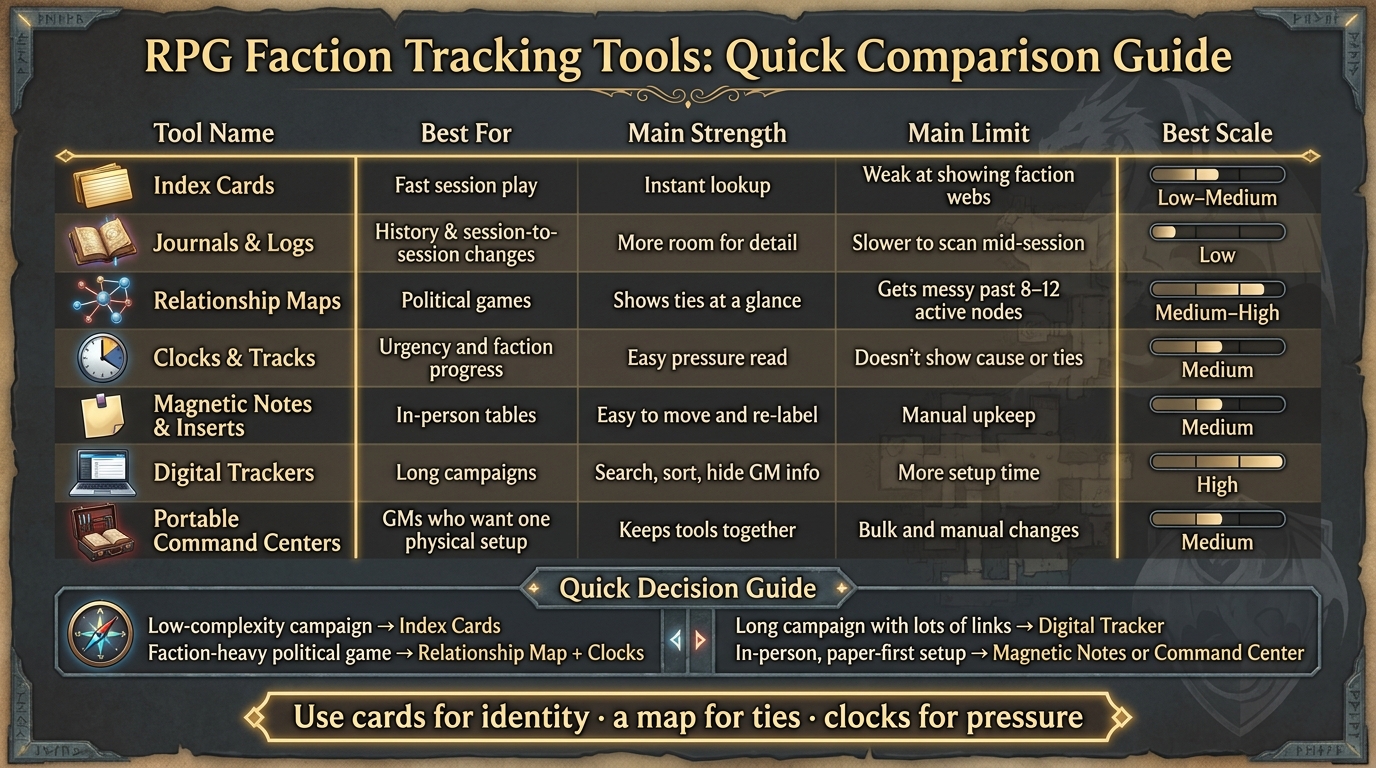
RPG Faction Tracking Tools: Quick Comparison Guide
Top 5 Ways to Track your Solo RPG World
sbb-itb-74d578b
Quick Comparison
| Tool | Best for | Main strength | Main limit | Best scale |
|---|---|---|---|---|
| Index Cards | Fast session play | Instant lookup | Weak at showing faction webs | Low–Medium |
| Journals & Logs | History and session-to-session changes | More room for detail | Slower to scan mid-session | Low |
| Relationship Maps | Political games | Shows ties at a glance | Gets messy past 8–12 active nodes | Medium–High |
| Clocks & Tracks | Urgency and faction progress | Easy pressure read | Doesn’t show cause or ties | Medium |
| Magnetic Notes & Inserts | In-person tables | Easy to move and re-label | Manual upkeep | Medium |
| Digital Trackers | Long campaigns | Search, sort, hide GM info | More setup time | High |
| Portable Command Centers | GMs who want one physical setup | Keeps tools together | Bulk and manual changes | Medium |
If I were choosing fast:
Low-complexity campaign: index cards
Faction-heavy political game: relationship map + clocks
Long campaign with lots of links: digital tracker
In-person, paper-first setup: magnetic notes or a command center
That’s the whole decision in plain terms: match the tool to your faction count, table speed, and how often things change.
1. Index Card Faction Sheets
Index cards are a simple, dependable way to track factions at the table. Each card can hold the faction's name, type, status, leader, seat, goal, holdings, debts, and stance toward the party. Keep the front public-facing. Use the back for secrets, hidden motives, and debts.
Table Access
Cards are the fastest option at the table. There’s no login, no loading screen, and no app to click through. You just grab the right card and answer a player’s question in seconds [1].
Update Speed
They’re just as fast to update. Write a short session note, change the faction’s influence score or latest key event, and move on. A small "Last Change" line helps connect each update to play without turning the card into a full session log [4].
Network Clarity
Index cards don’t connect factions on their own. That’s the trade-off. To see the bigger picture, pair them with a simple relationship map that shows who likes whom, who owes what, and where the pressure points sit [5][6].
Portability
Index cards stay portable if you keep the active stack small. If a card hasn’t mattered for three sessions, retire it and move it into a cold archive [4]. And if one faction starts dragging a long paper trail behind it, that’s usually your sign to move it into a running log.
2. Journals and Running Logs
Use a journal like a working ledger, not a campaign scrapbook. If a faction outgrows a single card, shift its history into a running log. Keep the focus on what that faction wants now, what it owes now, and what changed from one session to the next.
Update Speed
After each session, write down one-line updates: a stance change from Neutral to Rival, a new debt, a broken promise. That kind of shorthand keeps the history easy to scan instead of turning it into a wall of text [4]. It also saves time when the session ends. During play, though, finding details back can be slower.
Table Access
Journals are slower to search than cards [2]. In the middle of a session, finding one detail can mean flipping through pages or bouncing between a doc, spreadsheet, and Discord thread [10]. A standard format helps a lot. If every faction entry uses the same structure - identity, stakes, and a private section for hidden goals - you know exactly where to look every time [4].
Network Clarity
Journals hold faction ties in paragraph form, and that makes the full political picture harder to read when play speeds up [10]. So use the journal as the record. Use a map when you need the live faction web at a glance.
Portability
Paper is easy to carry and always ready [1]. Digital logs in Notion or Google Docs sync across devices and let you search and link material between sessions [1]. A simple split works well: use paper for table notes, and use digital tools for search and linking between sessions [1]. Paper keeps your notes easy to bring anywhere as part of a DM command center; the next tool makes the network easier to see at a glance.
3. Relationship Maps and Mind Maps
A relationship map lets you see faction ties at a glance. And at the table, that kind of speed matters more than logging every tiny detail.
Network Clarity
Relationship maps work best when your campaign is full of crossed loyalties, old favors, hidden debts, and groups pulling in different directions. A simple color system for conflict, alliance, family, or secret ties helps you read the whole network in seconds instead of squinting through notes.
As Matthijs Holter said about his browser-based Skromt relationship tool:
"The result looks more like a pinboard than a flowchart... The players see the map on a shared screen with only the NPCs they've met and the relationships they've uncovered. I see everything." [5]
That split is handy. Players only see what they’ve earned, while hidden ties stay out of view until the moment they come to light.
Table Access
Physical maps have a big upside: players can read them right there on the table. Cards on a corkboard, tokens, or shields give everyone a clear sense of who’s tied to whom without the GM having to spell it out every time.
DungeonVault’s "Game of Shields" system shows this well. It uses 81 distinct heraldic shields to stand in for faction aspects, so players can read the faction web straight from the table [9]. To keep things readable, cap your active factions at 8–12. Go past that, and the map starts to feel crowded fast, which makes it harder for players to follow what’s going on [9].
Update Speed
Physical maps are fast to update. Move a card or shift a shield, and the new state is right in front of everyone. Digital mind maps have their own upside too: linked nodes and quick-edit controls make between-session changes easy [8][11].
For physical setups, DungeonVault shares a simple tip that saves time:
"Simply take pictures of the political landscape with your phone, as things change. This drastically reduces the need to make notes and allows you to focus on the action." - DungeonVault [9]
That’s one of those small habits that pays off right away.
Portability
A small deck of cards or a folded relationship map is easy to carry from one game spot to another. Digital mind maps travel well on a tablet or laptop, but they can come with extra friction: a device, load time, or a login screen. If your group moves between homes, stores, or convention spaces, a physical map cuts out those steps.
Digital tools make more sense for long campaigns that need searchable nodes and linked NPC pages [1]. And when faction ties start shifting every session, clocks can make that pressure easy to spot.
4. Clocks and Progress Tracks
Clocks and progress tracks are great at showing pressure. A relationship map shows who is linked to whom. A clock shows how much strain a faction is under, or how close it is to a certain event. If maps show the connections, clocks show how hard those connections are being pulled.
Table Access
A clock is easy to read in the middle of a session. Whether it's a hand-drawn clock or a digital progress bar [13], you can see the current state right away. Some digital tools also let you change faction standing in steps of 5 with one click [13], which helps the game keep moving.
As CritForge puts it:
"The escalation stage (Skirmish, Escalation, Crisis, Resolution) gives you a campaign-pacing tool built in." [8]
Those escalation stages - Skirmish, Escalation, Crisis, Resolution - turn pressure into a pacing track you can scan in a second.
Update Speed
Progress tracks are fast to update, but only when something changes. Multiloop says it plainly:
"A faction tracker fails when it becomes its own workload. These three rules keep it small and keep every row alive: Add on pressure. Update only on movement. Retire often." [4]
That advice matters. If a faction's clock hasn't moved in three sessions and nothing is pushing it, retire it to a cold archive [4]. Keep the tracker focused on the rows that are still ticking.
Network Clarity
Clocks show pressure, not cause. That's the key limit. A relationship map shows who shoved the faction into that spot. A clock can tell you a faction is at crisis level, but it can't show which rival got them there. So clocks work as a pressure layer, not a stand-in for the map.
Portability
Paper clocks are fastest at the table. Digital tracks work better when you need access across devices. If you track things with numbers, Influence Points (IP) can make each choice feel weighty:
- Minor quests grant ±1
- Major quests grant ±3
- Critical events grant ±5
And if the tracker needs to change shape as fast as the table does, magnetic notes are a good fit.
5. Magnetic Notes and Modular Inserts
Magnetic notes and modular inserts land in a useful middle ground. They’re physical, so you can grab one and read it fast. But they’re also easy to move around when alliances change in the middle of a session. In play, they work well as movable faction labels that shift as the story shifts.
Table Access
Behind the screen, physical notes give you a fast visual check without digging through pages or bouncing between browser tabs. One insert can hold a faction’s current status plus a short note about the latest change. That makes it handy when you want visible status without keeping a full running log in front of you. [2]
The big draw here is tactile visibility. You can see a faction’s current posture - Ally, Rival, Hostile - at a glance. [4]
Portability
These notes are easy to carry. A small batch of inserts fits neatly into a folder. Once the number of active factions starts to grow, though, the pile can get bulky. [2][12]
Network Clarity
Modular inserts work best when you use both sides with purpose: visible status on the front, hidden details on the back. That setup keeps the table-facing side clean while private information stays out of player view. [4][3]
The weak spot is secrecy. If everything sits out in the open, players can see it too. Matthijs Holter put it plainly:
"Index cards on a table worked for a while, but I kept wanting to hide certain connections from my players, and I wanted it on a screen during play."
- Matthijs Holter [5]
The usual fix is simple: keep DM-only notes on the back of the insert or in a hidden layer. [4][3]
Update Speed
Every change is manual, and that’s the main downside. Erasing, rewriting, or swapping a note takes more time than changing a digital tracker. One solid habit is to make one master insert for each faction or NPC, then point back to it instead of repeating the same information in several places. [3]
It also helps to update notes only when a faction actually changes, then archive the insert once that faction stops mattering. At some point, the physical stack can start slowing you down. When that happens, spreadsheets and digital trackers are better at handling search and recall.
If you want that kind of workflow in one portable setup, WyrmCodex brings together one of the best DM screens, a dice tower, refillable journal, and magnetic modular accessories in a dragon-forged tome.
6. Spreadsheet and Digital Tracker Options
When cards and inserts start taking over the table, digital trackers make life a lot easier. You can search, sort, and update faction data fast. And once your live stack no longer fits in front of you, that speed matters.
Table Access
Digital trackers shine when you need one layer for the GM and another for the players.
Skromt, for example, lets you hide any card or connection, then switch to player view with a single click. Matthijs Holter, creator of Skromt, put it this way:
"The feature I use most is the GM/Player view toggle. You can mark any card or connection as GM-only, and with one click switch to the player view where all of that disappears." [5]
Multiloop also removes GM-only notes from player view, while Crystal Forge uses 0–100 score bars that are easy to scan at a glance. [4][13]
Portability
Multiloop and Crystal Forge both support JSON export, which means your faction data can move with you across devices. [4][13]
Once your data travels well, the next thing to look at is how well the tool shows the full web of faction ties.
Network Clarity
Spreadsheets work well for one-way or uneven relationships. A simple grid with values from –5 to +5 can handle that job cleanly. [7]
But when the shape of the whole faction web matters more than the numbers, graphs and mind-map tools are often easier to read. CritForge and the ddf-faction-manager module both include relationship graphs and mind-map-style displays, which help make tangled faction networks easier to follow. [8][11]
Update Speed
Some tools are built for quick changes in the middle of prep.
- Crystal Forge uses clickable score bars, so you can change faction attitude in one click with steps of 5. [13]
- CritForge uses sliders for Power, Morale, and Treasury, which makes between-encounter updates fast. [8]
- Multiloop keeps each record compact and shows a clear last-change line. [4]
If you want the tracker, screen, and notes in one travel-ready setup, the next step is a portable command center.
7. Portable DM Command Centers (including WyrmCodex-style setups)
When separate tools start to feel like too many moving parts, a command center pulls them into one workflow. Put cards, logs, and screen notes into a travel-ready setup, and sessions tend to move with less stop-and-start.
Table Access
If cards, maps, and logs work best as separate pieces, a command center keeps the live version of each close at hand. Outward-facing faction cards or screen panels give players a fast read on the political landscape without making you explain the same thing again and again.
A simple split works well:
- Keep public faction data facing the players
- Keep DM-only notes behind the screen
That way, the table sees what matters to them, while your private notes stay tucked away.
Portability
A solid command center should pack down fast and open in one motion. WyrmCodex follows that model with a DM screen, LED dice tower, refillable journal, and magnetic command panels built into one dragon-forged tome. Everything travels together and opens as one integrated setup.
That matters more than it might seem. When all your gear lives in one place, setup gets easier, teardown gets easier, and you're less likely to leave some small but annoying piece behind.
Network Clarity
Physical command centers work best when the active roster stays easy to read at a glance. Magnetic modular panels or pinned faction cards can mirror that structure at the table. The result is simple: alliances and rivalries become visible right away instead of living only in your notes.
For players, that can make the world feel more alive. For you, it means less mental juggling in the middle of a scene.
Update Speed
Low-friction manual updates - moving a card, flipping an insert, or marking a status change - help keep the session moving without breaking its rhythm. You make the change, the table sees it, and play continues.
The tradeoff is more prep up front, which the pros-and-cons summary makes easier to weigh.
Pros and Cons at a Glance
Not every tool works for every campaign. Some are best for a light setup. Others make more sense when your world starts to sprawl. This table gives you a quick way to sort your options before you commit.
| Tool | Pros | Cons | Best Use Case | Best Fit Scale |
|---|---|---|---|---|
| Index Cards | Quick reference; tactile; easy to update mid-session | Limited space; hard to visualize complex webs | Tracking core stats and current leaders | Low–Medium |
| Journals & Logs | High narrative detail; tracks long-term history | Slow to search; high maintenance | Narrative-heavy campaigns with few factions | Low |
| Relationship Maps | Visualizes alliances and rivalries; shows the web | Can become cluttered with too many nodes | Political intrigue and mystery-heavy games | Medium–High |
| Clocks & Progress Tracks | Visualizes urgency and pressure; easy to read | Abstract; doesn't store identity or relationship data | Tracking faction goals and looming threats | Medium |
| Magnetic Notes & Modular Inserts | Easy to rearrange; helps players grasp shifting dynamics instantly | Requires physical space; manual maintenance | In-person play with a dedicated table setup | Medium |
| Digital Trackers | Automated; links to NPCs and locations; searchable | High setup time; risk of over-complexity | Complex, world-spanning campaigns | High |
| Portable Command Centers | Keeps cards, notes, and screen panels in one portable setup | Physical bulk; manual updates required | In-person play with dedicated table space | Medium |
The main problem usually isn’t losing information. It’s building a system that eats table time and turns into homework. As Multiloop notes:
"A faction tracker fails when it becomes a second campaign to run." [4]
That line gets to the heart of it. For most campaigns, you don’t need a giant archive sitting in front of you. You need a small live stack that helps you run the next session without digging through a mountain of notes.
A good rule: keep only 3–4 factions in the live stack, then bring others back in when they start to matter. If a faction hasn’t moved, left open threads, or put pressure on the world for three consecutive sessions, move it to a cold archive [4].
Which Tool Fits Your Campaign
No single tool works for every campaign. The right pick depends on how many factions are active, how fast your sessions move, and how you like to track things - on paper, with visuals, or in linked records.
Use the table below to match your current faction load to the lightest tool that still helps you answer fast.
| Tool | Faction Count | Session Tempo | GM Style |
|---|---|---|---|
| Index Cards | Low (3–4 active factions) [2] | Fast | Paper-first [2] |
| Journal | Low [1] | Fast to capture; slower to search [1] | Chronological logging [1] |
| Relationship Map | Moderate [5] | Any | Visual; tracking connections [5] |
| Clocks & Progress Tracks | Any [4] | Fast | Modular; tracks specific goals [4] |
| Magnetic Notes & Inserts | Moderate | Fast | Modular; shifting alliances at a glance |
| Digital Tracker | Long-running campaigns [1] | Slower to set up; better long-term [1] | Digital-first; linked records [1] |
| Portable Command Center | Low–Moderate | Fast | All-in-one; combines paper and modular tools |
Once the table narrows your options, the next step is simple: match the tool to the way you actually run the game.
If your sessions are tight and fast, and you only have a few active factions in play, index cards or a small modular setup will usually do the job better than a digital tracker. They’re easier to pull out in the moment, and that matters when the table is moving fast.
If your campaign runs across multiple arcs with connected NPCs, a digital tool with linked records starts to earn its keep over time. It takes more work up front, but it makes long-term tracking far less messy.
And if political intrigue sits at the center of your story, a relationship map can do a lot of heavy lifting. Even a simple hand-drawn version keeps the web of loyalties, grudges, and side deals in plain view.
For paper-and-modular play, a WyrmCodex-style command center fits this lane well: one portable setup for the screen, journal, and magnetic faction tools.
FAQs
How do I know when to switch from paper to digital tracking?
Switching from paper to digital is a personal call. It usually makes sense when manual tracking starts getting in your way - papers stack up, cross-checking turns into a chore, or NPC names and faction ties start slipping through the cracks.
Stick with paper if you like a tactile, portable command center, whether that’s a refillable campaign journal or a box of index cards. No power needed. No setup. It works at any table.
What should I put on a faction card first?
Start with the basics: the faction’s name, type, main goal, and leader. That gives you enough to spot the group and play it at the table.
Then add a few quick-reference details: key members, its current stance toward the party, area of influence or headquarters, and an accent color or emblem so you can recognize it at a glance.
How many factions can I track without slowing down play?
To keep play moving, track only the factions that have clear agency and actual pull in the current story arc. Put your attention on the groups that deal with the party face-to-face or have near-term goals that can shape the session.
If things start to sprawl, fold smaller groups under parent factions instead of giving every minor crew its own full write-up. A one-page ledger or a tight relationship map can help you see the big links at a glance without drowning in notes.